
1Export column forces from ETABS
In ETABS, open the column forces table (Column Forces), filter the columns and load combinations you want to check, and copy the table together with its headers. You can also export to Excel first, tidy the data, and copy from there.
2Paste into StructFlow
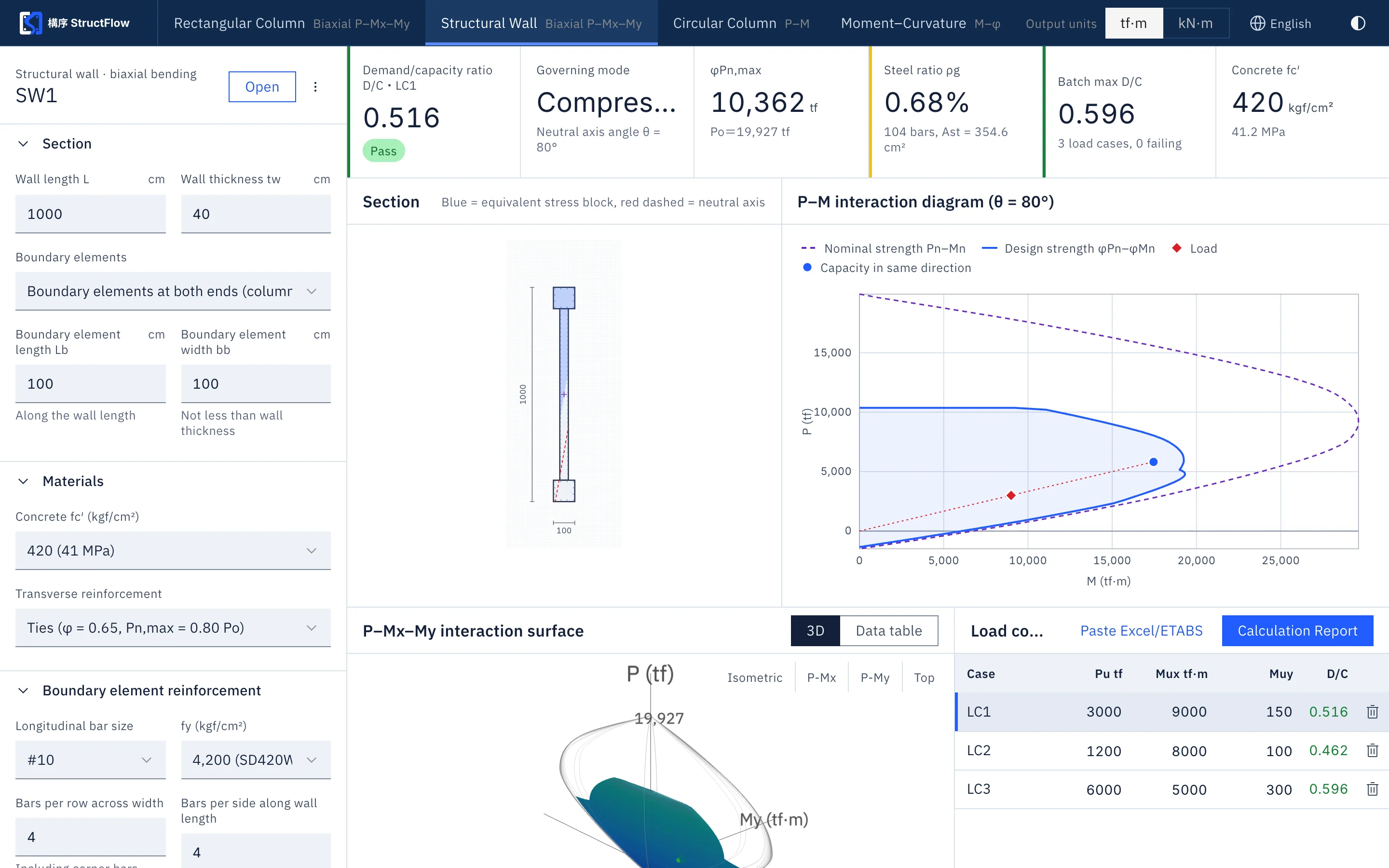
Paste directly into the load check area of the rectangular column, structural wall, or circular column tool. StructFlow automatically recognizes the axial force and the two moment columns and converts signs; if you prepare the table yourself, four columns are enough: name, Pu, Mux, Muy.
3Read the results
Every load case gets a demand/capacity ratio (D/C) and a pass or fail result. Sort by D/C, or show only the combinations that fail, and the controlling cases are quickly found.
4Output and handover
Check results are carried into the calculation report, which can be printed or saved as a PDF; project files and share links let colleagues or reviewers open the same results.
5Quick tips
- Keep units consistent: confirm the force and moment units of the ETABS output before pasting; StructFlow can switch between tf·m and kN·m
- Tens of thousands of cases can be pasted at once, with no need to split them up
- After changing the section or reinforcement, the check results are recalculated immediately
Paste in your column forces table and try it.
Sign up free with a SUHUL EIP account; all tools are open for 14 days.